
The practical answer
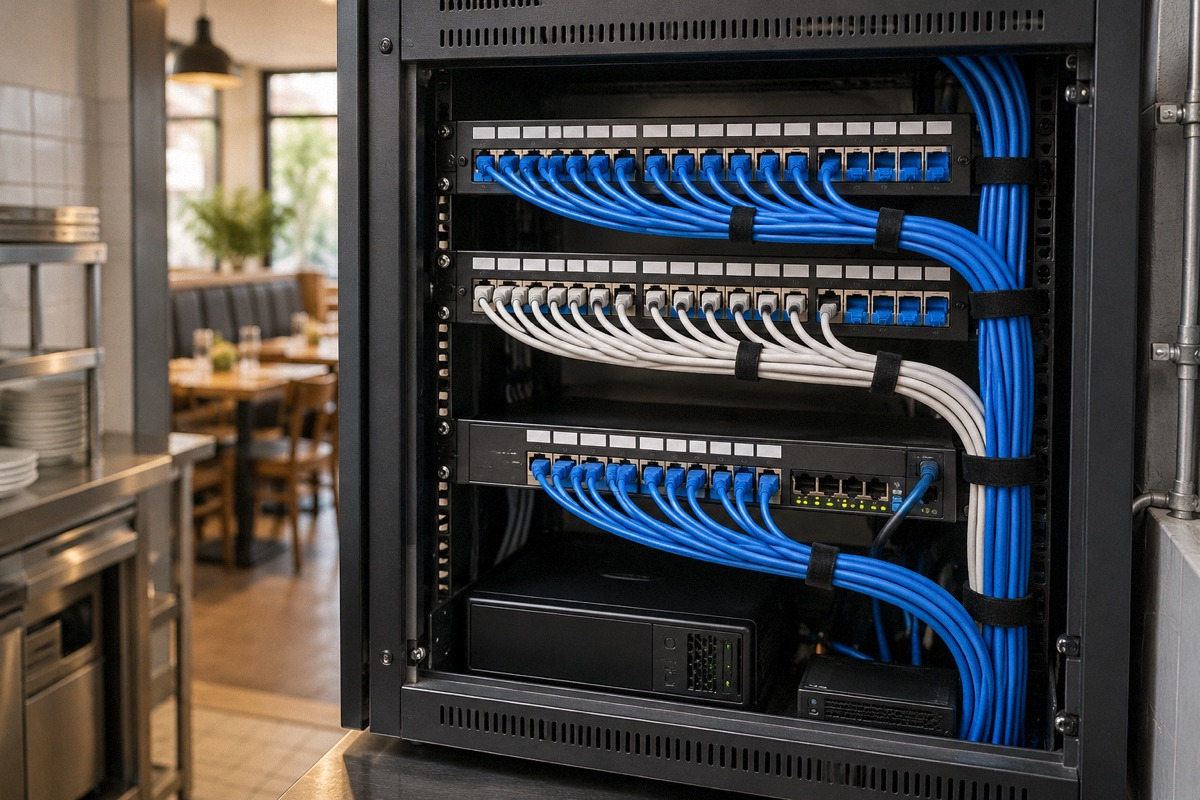
Tangled, unlabeled cabling in acquired stores is a physical problem and a configuration problem, and they usually need different people. A low-voltage or structured-cabling contractor replaces and labels cable runs, terminates and tests them and builds a secured rack; an IT or managed network provider configures the router, firewall, payment network separation and Wi-Fi; the POS vendor confirms what its terminals need. Write one network standard for all stores, survey every site, pilot it in the worst store, then roll out with as-built documentation that the next technician can follow.
What bad cabling looks like during service
Cabling problems rarely announce themselves as cabling. They show up as a terminal that drops offline at the peak of lunch, a kitchen printer that stops receiving tickets until someone wiggles a cord, online orders that arrive late or not at all, or a card reader that times out. Staff restart devices, the problem goes away for a day, and the root cause stays hidden in a ceiling or behind a reach-in.
Multi-unit operators meet this most sharply after an acquisition, when each store was wired by a different previous owner over several years. An operator who had just bought four franchise stores described this in r/restaurantowners: messy, unsecured CAT5 cabling at every site and no clear idea which kind of contractor to call (Who to call?). The recorded material is a short excerpt of that post, so it shows the problem is real but says nothing about the right fix. The real diagnosis in situations like this is that nobody owns the network as a system, so each fault is treated as a device failure.
Separating physical faults from configuration faults
Before calling anyone, sort symptoms into two groups. Physical faults involve the cable, its connectors and the hardware it plugs into: damaged or crushed cable, loose or badly crimped ends, runs too close to fryer heat or motors, consumer-grade switches daisy-chained under a counter, and patch cords nobody can trace. Configuration faults involve how the equipment is set up: duplicate addresses, an outdated router, guest Wi-Fi sharing the same network as payment terminals, or no one holding the admin passwords.
Intermittent faults that follow a particular cable or port, or that change when something is moved, usually point to the physical side. Faults affecting every device at once, or that follow a time of day or the number of guests on Wi-Fi, often point to configuration or internet service. Most acquired stores have both, which is why the scope split in the next section matters.
Low-voltage contractor, IT provider or POS vendor: who does what
A low-voltage or structured-cabling contractor handles the physical layer: pulling new cable, terminating it in jacks and a patch panel, testing each run, labeling both ends, mounting a rack or wall cabinet, and removing abandoned cable where the building owner and code allow. Licensing for low-voltage work varies by jurisdiction; confirm with your local licensing authority what license this work requires and check the contractor's license and insurance directly rather than relying on a statement in a proposal. Cable types in ceilings used for air movement, and any penetration of fire-rated walls, are governed by the codes your jurisdiction adopts, so ask the contractor whether the work needs a permit.
An IT or managed network provider handles configuration: router and firewall setup, separating payment devices from guest and office traffic, Wi-Fi design, remote monitoring and password management. The POS vendor specifies what its terminals, printers and kitchen displays need, such as wired versus wireless connections and any network settings, and may need to be on site at cutover. If new outlets or a dedicated circuit for the rack are needed, that is a licensed electrician's work. Some firms cover more than one of these roles; what matters is that the contract states every task and who is responsible for it.
| Task | Usually belongs to | Ask for in the proposal |
|---|---|---|
| New cable runs, jacks, patch panel | Low-voltage or structured-cabling contractor | Drop count per store, cable category, test results for every run |
| Rack or wall cabinet, cable management, labeling | Low-voltage contractor | Location, locking, labeling format matching your standard |
| Router, firewall, network separation, Wi-Fi | IT or managed network provider | Configuration summary, password handover, monitoring scope |
| Terminal, printer and kitchen display requirements | POS vendor | Written device list and connection requirements |
| Outlets, dedicated circuits, surge protection at the rack | Licensed electrician | Permit status where required |
| Internet circuit to the building | Internet service provider | Handoff location and support contacts |
Writing one network standard for every store
A standard turns four different networks into one pattern. It does not need to be long. It should specify where the network equipment lives, how it is secured and ventilated away from kitchen heat and grease, what cable category is used, how jacks and patch panel ports are labeled, which devices must be wired rather than wireless, how payment devices are kept separate from guest Wi-Fi and office computers, and what the backup internet arrangement is, if any.
For the configuration part, the Payment Card Industry Security Standards Council's small-merchant firewall guidance is a useful baseline. It recommends changing the vendor's default password to a strong one, restricting inbound and outbound traffic to payment systems to only what is necessary, avoiding allow-any rules, denying traffic you do not specifically authorize and installing firewall updates as soon as they are available (PCI Firewall Basics). PCI guidance is an industry standard, not a government regulation; the PCI Council's merchant page says merchants should ask their acquirer or payment brand which compliance validation applies to them (PCI merchant resources).
- Locked rack or cabinet in a ventilated spot away from heat, water and grease.
- One labeling scheme for jacks, patch ports and switch ports, identical in every store.
- POS terminals, kitchen printers and displays wired wherever the device supports it.
- Payment devices separated from guest Wi-Fi and office devices.
- Default passwords changed, credentials stored in a shared password manager the group controls.
- Surge protection and, if chosen, battery backup for the rack, sized by the installer.
- As-built drawing, port map and test results delivered before final payment.
Worked example: four acquired stores, one standard
Hypothetical example, for illustration only. A group surveys its four newly acquired stores using the same checklist. Store A needs 14 network drops, Store B 11, Store C 18 and Store D 9, a total of 52. Store C also logged nine POS outages in the previous month, more than the other three stores combined, and has a consumer switch zip-tied above the dish area.
The group sends the same written standard and drop counts to three low-voltage contractors and asks for per-store pricing, test reports and labeling in the specified format. Separately, it asks its IT provider to quote the configuration work for all four sites. Store C becomes the pilot because it has the most outages and therefore the clearest before-and-after measure. After cutover, the manager tracks outages for a month; if the count drops sharply and the as-built documents are complete, the group approves the same scope for the other three stores, scheduling each cutover overnight between closing and opening.
Rolling out without breaking service
Cutovers should happen when the store is closed, with the installer, the IT provider and someone who can test every POS function on site or on call. Before work starts, photograph the existing setup and record which device is plugged into which port, so rollback is possible. Afterward, run a test script: open and close a check on each terminal, print to every kitchen printer, send a test online order and a test delivery-platform order, and run a small card transaction and refund.
Sequence stores so lessons from each cutover improve the next. Keep the standard under version control, even if that means a dated file in a shared folder, and update it when you learn something, such as a better rack location or a device that must be wired.
Documentation the next technician can actually use
The point of the cleanup is that the next fault can be traced in minutes. Require, as a condition of completion, an as-built floor plan showing each drop, a port map linking each jack to its patch panel and switch port, test results for each run, photographs of the finished rack, a configuration summary from the IT provider and the location of all credentials. Store copies centrally and a printed one-page summary inside each rack door.
Agree how changes are recorded. When a new printer is added, the person who adds it updates the port map. Without that habit, a standardized network drifts back to a tangle within a couple of years.
Acceptance checklist before final payment
Use this checklist to confirm the work matches what was ordered. Payment terms and remedies depend on your contract and local law; the checklist identifies evidence, not what to pay.
- Every drop labeled at both ends according to the standard.
- Test results provided for every new run.
- Rack secured, ventilated and away from kitchen heat and grease.
- Abandoned cable removed or documented, as agreed with the landlord.
- Payment devices confirmed separate from guest Wi-Fi by the IT provider.
- All POS, printer, display, online order and card test transactions completed successfully.
- As-built plan, port map, configuration summary and credentials handed over.
Questions that come up next
Who should I call to clean up restaurant network cabling?
For the physical cable, jacks, rack and labeling, a low-voltage or structured-cabling contractor. For router, firewall, payment network separation and Wi-Fi, an IT or managed network provider. Your POS vendor should confirm device requirements, and a licensed electrician handles new power. Verify licensing requirements with your local licensing authority.
Should restaurant POS terminals be on the same network as guest Wi-Fi?
Keep them separate. PCI Security Standards Council small-merchant guidance recommends restricting traffic to payment systems to only what is necessary and denying traffic you do not authorize. Ask your IT provider to document how payment devices are separated, and ask your acquirer which compliance requirements apply.
Sources & context
Forum accounts are unverified experiences. Read government sources for their stated jurisdiction and check requirements with the responsible authority for your location.
- Who to call? (r/restaurantowners)reddit · An owner of four newly acquired franchise stores describes messy, unsecured CAT5 cabling and uncertainty about which contractor to call. Treated as excerpt-level evidence; the replies were not relied on and no contractor recommendation is drawn from it.
- PCI Firewall Basics (PCI Security Standards Council)primary · Industry guidance listing a minimum suggested firewall configuration, including changing default passwords, restricting traffic to payment systems and installing updates. An industry standard body's guidance, not a law; does not address physical cabling.
- Merchant Resources (PCI Security Standards Council)primary · States that whether a small merchant must validate compliance is determined by the payment brands and that merchants should ask their acquirer. Supports the instruction to confirm requirements with your acquirer.


